

Cyllo Insurance Documentation
Introduction
Managing insurance operations involves handling multiple processes such as customer registration, policy creation, underwriting, premium management, claims processing, renewals, approvals, and document tracking. Performing these activities manually can lead to delays, errors, and difficulties in maintaining operational efficiency.
The Cyllo Insurance Management provides a centralized and automated platform designed to simplify and streamline the complete insurance lifecycle. It enables organizations to efficiently manage policies, assess risks through underwriting processes, handle claims, generate invoices, and monitor policy renewals from a single system.
With integrated workflows, automated validations, approval mechanisms, and real-time tracking, the module improves productivity and ensures accurate management of insurance operations. It reduces manual effort, enhances transparency, and provides better control over policy and customer-related activities.
The module is designed to support insurance providers in delivering faster services, maintaining accurate records, and improving overall operational performance while ensuring a smooth user experience.
1. Insurance
1.1 Insurance Plan
The Insurance Plan feature is used to define and manage different insurance offerings available within the system. An insurance plan acts as a template that contains policy-related information such as premium amount, coverage limits, deductibles, duration, claim periods, and activation rules.
Insurance plans help standardize policy creation by allowing users to predefine the coverage structure and financial configurations. Once a plan is created, it can be used while creating insurance policies, ensuring consistency and reducing manual effort.
The module also supports recurring plans, policy activation conditions, no-claim bonus configurations, and plan lifecycle management through different states.
How to Create an Insurance Plan
To create a new insurance plan:
- Navigate to Insurance → Insurance Plans
- Click New
- Enter the required details:
- Plan Name
- Plan Code
- Policy Type
- Premium Amount
- Coverage Limit
- Duration
- Configure additional options:
- Deductible Amount
- Activation Policy
- Recurring Configuration
- No Claim Bonus settings
- Add coverage details if required
- Save the record
After creation, the plan initially remains in Draft state and can later be activated.
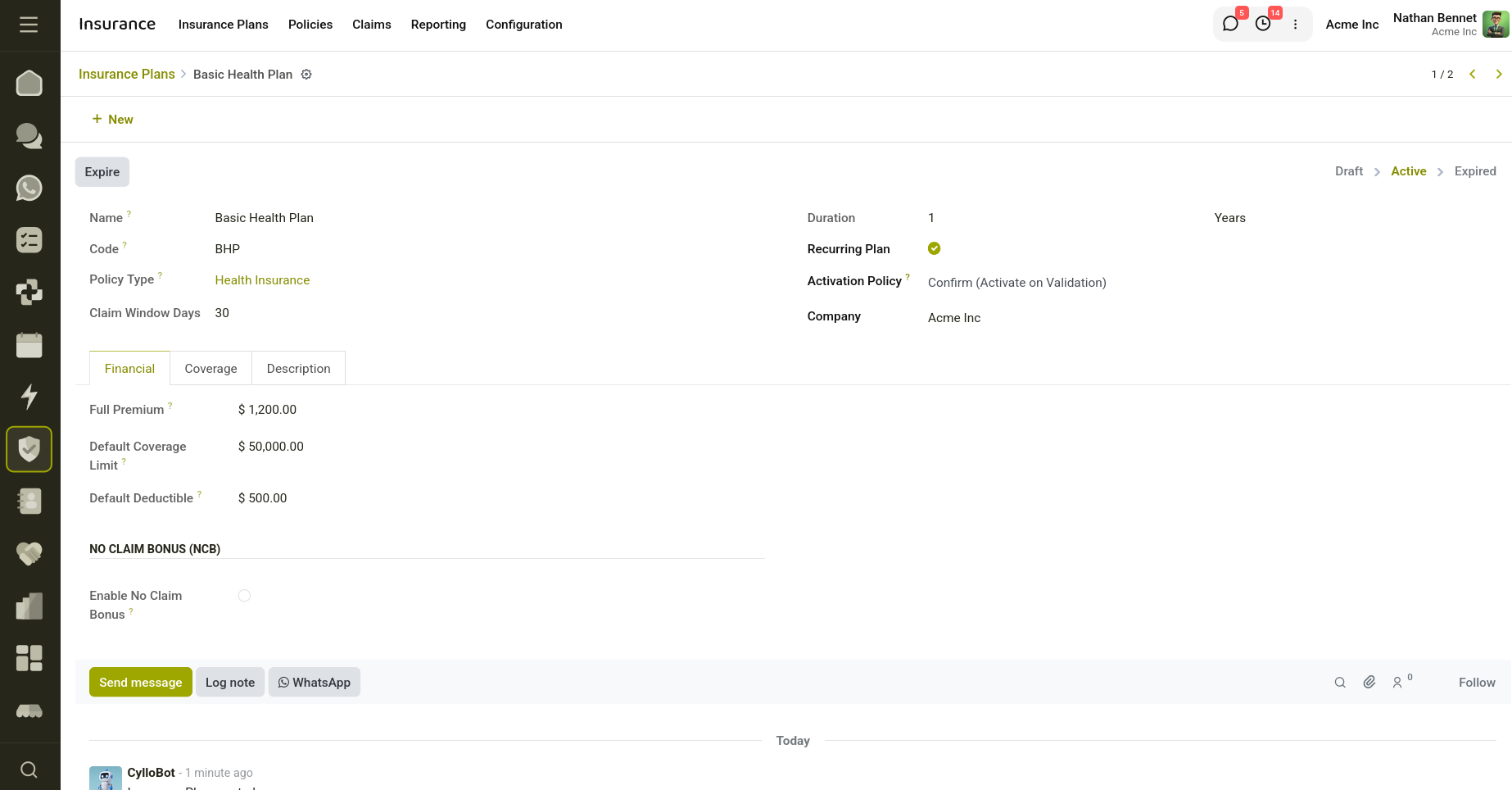
Fig 1.1 — Displays the Insurance plan creation.
Key Fields
- Name: Defines the name of the insurance plan.
- Code: Unique identifier used for the insurance plan.
- Policy Type: Specifies the policy category to which the plan belongs.
- Description: Additional information regarding the insurance plan.
- Company: Company associated with the insurance plan.
- Full Premium: Defines the total premium amount for the insurance duration.
- Coverage Limit: Maximum amount covered under the insurance plan.
- Deductible: Amount that the policyholder must pay before insurance coverage applies.
- Duration: Defines the validity period of the insurance plan.
- Duration Type: Specifies whether duration is measured in:
- Days
- Months
- Years
- Claim Window Days: Specifies the allowed number of days within which claims can be submitted.
- Recurring Plan: Enables recurring policy generation.
- Activation Policy: Defines when the policy becomes active.
- Enable No Claim Bonus: Allows accumulation of no claim benefits during renewals.
- NCB Increment per Renewal (%): Defines the percentage increment after each eligible renewal.
- Maximum NCB (%): Specifies the maximum bonus percentage allowed.
- Coverage Lines: Defines individual coverage components included in the insurance plan.
- States: The Insurance Plan passes through the following stages: Draft, Active, Expired.
Actions
- Activate: Changes the insurance plan status from Draft to Active.
- Expire: Changes the insurance plan status to Expired.
- Reset to Draft: Moves the insurance plan back to Draft state.
1.2 Insurance Policy
The Insurance Policy feature is used to create and manage customer insurance records within the system. A policy represents an agreement between the insurance provider and the customer that defines the coverage amount, premium details, claim eligibility, duration, and policy conditions.
Policies are created based on predefined insurance plans, allowing users to inherit plan configurations such as coverage limits, deductibles, duration, and coverage details automatically. The module also includes underwriting risk assessment, invoice generation, renewals, no-claim bonus management, and claim tracking.
Through automated validations and workflows, the Insurance Policy ensures efficient policy handling while reducing manual intervention and maintaining consistency.
How to Create an Insurance Policy
To create a new insurance policy:
- Navigate to Insurance → Policies
- Click New
- Select the required insurance plan
- Select the customer
- Enter the policy details:
- Start Date
- Coverage Limit
- Deductible Amount
- Customer Age
- The system automatically:
- Generates a policy number
- Fills coverage details from the selected plan
- Calculates policy end date
- Calculates premium amount
- Review coverage lines and additional details
- Save the record
- Confirm the policy and proceed with risk assessment
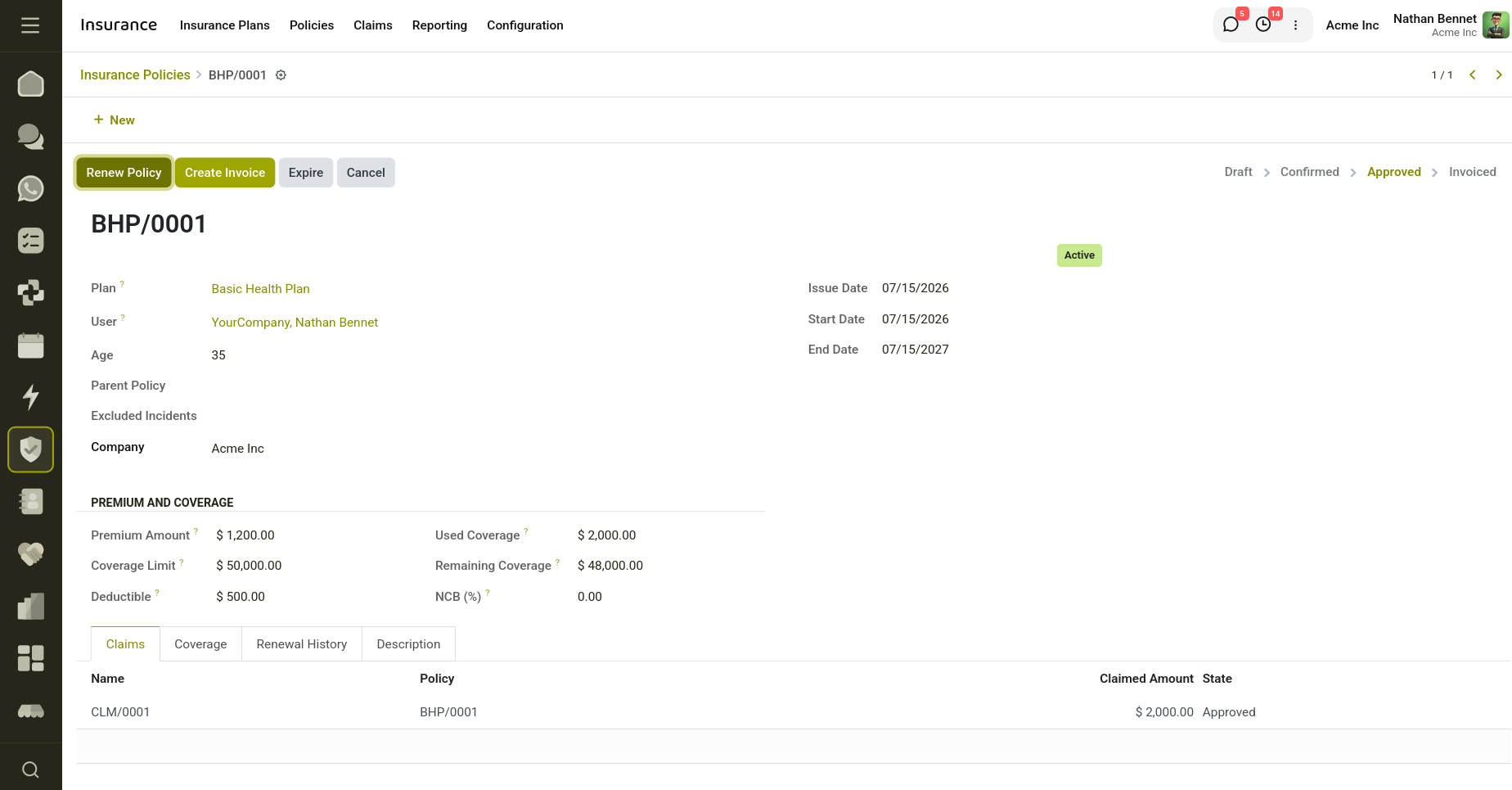
Fig 1.2 — Insurance Policy Creation.
Key Fields
- Policy Number: Automatically generated unique number for identifying the policy.
- Insurance Plan: Selected insurance plan used for policy creation.
- Customer: Policy owner associated with the insurance contract.
- Issue Date: Date on which the policy is created.
- Start Date: Defines when policy coverage begins.
- End Date: Defines policy expiry date.
- Description: Additional notes regarding the policy.
- Company: Company associated with the policy.
- Premium Amount: Total premium amount calculated for the policy.
- Coverage Limit: Maximum amount available for insurance claims.
- Deductible: Amount deducted before claim settlement.
- Used Coverage: Total approved claim amount already utilized.
- Remaining Coverage: Remaining available coverage after claim usage.
- Coverage Lines: Coverage items inherited from the selected insurance plan.
- Excluded Incidents: Incident types excluded from policy coverage.
- Age: Age of the customer used for underwriting validation and risk analysis.
- Risk Assessment Notes: Automatically generated notes from underwriting evaluation.
- Parent Policy: Previous policy associated with renewals.
- Renewal History: Displays previous policies in the renewal chain.
- NCB (%): Current No Claim Bonus percentage applied to the policy.
- NCB Discount Amount: Premium discount amount based on no-claim bonus.
- Status: Displays whether the policy is Active or Inactive.
- States: The Insurance Policy passes through the following stages: Draft, Confirmed, Under Review, Approved, Invoiced, Expired, Cancelled.
Actions
- Confirm Policy: Changes the policy from Draft to Confirmed.
- Assess Risk: Runs the underwriting risk assessment process. Evaluates the policy against active underwriting rules, automatically approves the policy if no risk conditions are triggered, and moves the policy to Under Review if risks are detected.
- Approve Policy: Approves a policy manually and moves it from Under Review to Approved state.
- Reject Policy: Rejects a policy after underwriting review and cancels policies that do not satisfy risk requirements.
- Create Invoice: Generates a premium invoice for the customer and changes the policy status to Invoiced.
- Renew Policy: Creates a new policy based on the current policy.
- Expire Policy: Changes policy status to Expired.
- Cancel Policy: Changes policy status to Cancelled.
- Reset to Draft: Moves the policy back to Draft.
1.3 Claims
The Insurance Claim allows policyholders to submit claims against their active insurance policies when an insured incident occurs. It helps organizations manage the complete claim lifecycle, from claim submission to approval and payout processing.
The module validates policy eligibility, incident dates, claim filing windows, policy coverage limits, and deductible calculations before processing claims. It ensures that claims comply with policy conditions and automatically calculates the final payout amount after deducting applicable amounts.
Through structured workflows and validations, the Insurance Claim simplifies claim handling and improves transparency and efficiency.
How to Create an Insurance Claim
To create a new insurance claim:
- Navigate to Insurance → Claims
- Click New
- Select the insurance policy
- Select the incident type
- Enter claim information:
- Incident Date
- Claimed Amount
- Description
- Save the record
- Submit the claim for review
- Approve or reject the claim based on policy validation
Key Fields
- Policy: Policy under which the claim is submitted.
- Incident Type: Type of incident for which the claim is raised.
- Incident Date: Date on which the insured incident occurred.
- Filing Date: Date on which the claim is submitted.
- Approved Date: Date on which the claim is approved.
- Claimed Amount: Amount requested by the policy holder.
- Approved Amount: Amount approved by the insurance provider.
- Payout Amount: Final payment amount after deducting applicable deductible values.
- Description: Additional details regarding the claim.
- States: The Insurance Claim passes through the following stages: Draft, Submitted, Approved, Rejected, Paid.
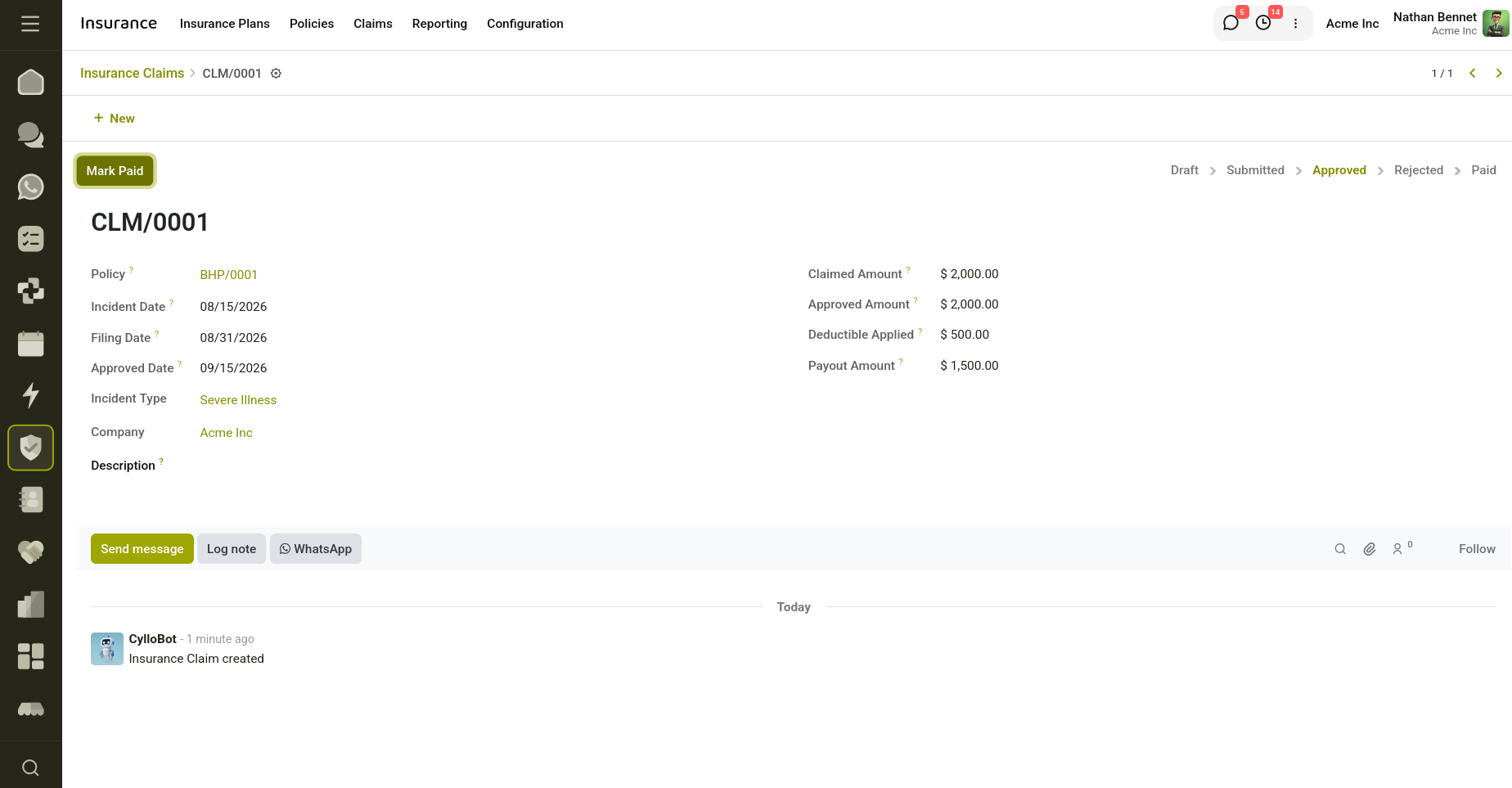
Fig 1.3 — Insurance Claim.
Actions
- Submit Claim: Changes the claim status from Draft to Submitted. Validates whether the policy is active and checks whether policy invoices are paid.
- Approve Claim: Changes the claim status from Submitted to Approved. Validates the excluded incidents, checks remaining coverage availability, and calculates approved amount and payout values.
- Reject Claim: Changes the claim status to Rejected.
- Mark Paid: Changes the claim status to Paid.
2. Configuration
2.1 Underwriting Rules
The Insurance Underwriting Rule feature is used to define risk evaluation criteria for insurance policies. Underwriting rules help insurance providers automatically assess customer eligibility and identify potential risks during policy processing.
The module evaluates policies against predefined conditions such as age limits, coverage amounts, premium values, claim history, claim frequency, and high-risk incidents. When a policy triggers any configured rule, it is moved for manual review instead of automatic approval.
Through automated rule evaluation, the underwriting system improves decision-making, reduces manual effort, and ensures consistent risk assessment.
How to Create an Insurance Underwriting Rule
To create a new underwriting rule:
- Navigate to Insurance → Configuration → Underwriting Rules
- Click New
- Enter the rule information:
- Rule Name
- Sequence
- Rule Type
- Select applicable insurance plans if required
- Configure the conditions according to the selected rule type
- Enable the rule
- Save the record
The created rule will automatically participate in policy risk assessments.
Key Fields
- Rule Name: Defines the name of the underwriting rule.
- Active: Enables or disables the underwriting rule.
- Description: Additional information regarding the rule.
- Applicable Plans: Defines specific insurance plans where the rule should apply. If left empty, the rule applies to all plans.
- Rule Type: Specifies the type of risk assessment criteria:
- Maximum Applicant Age
- Maximum Coverage Limit
- Minimum Premium Amount
- Severe Accident / Claim History
- High Claim Frequency
- High-Risk Incident Type
- Maximum Age: Triggers review if customer age exceeds the configured limit.
- Maximum Coverage Limit: Triggers review if requested policy coverage exceeds the configured value.
- Minimum Premium Amount: Triggers review if the premium amount is below the defined threshold.
- Maximum Approved/Paid Claims: Defines the maximum number of approved claims allowed before triggering review.
- Maximum Claims in Period: Defines the claim count threshold within a specific period.
- Lookback Period (Months): Defines the number of months used while evaluating claim frequency.
- High-Risk Incident Types: Specifies incident types considered high-risk.
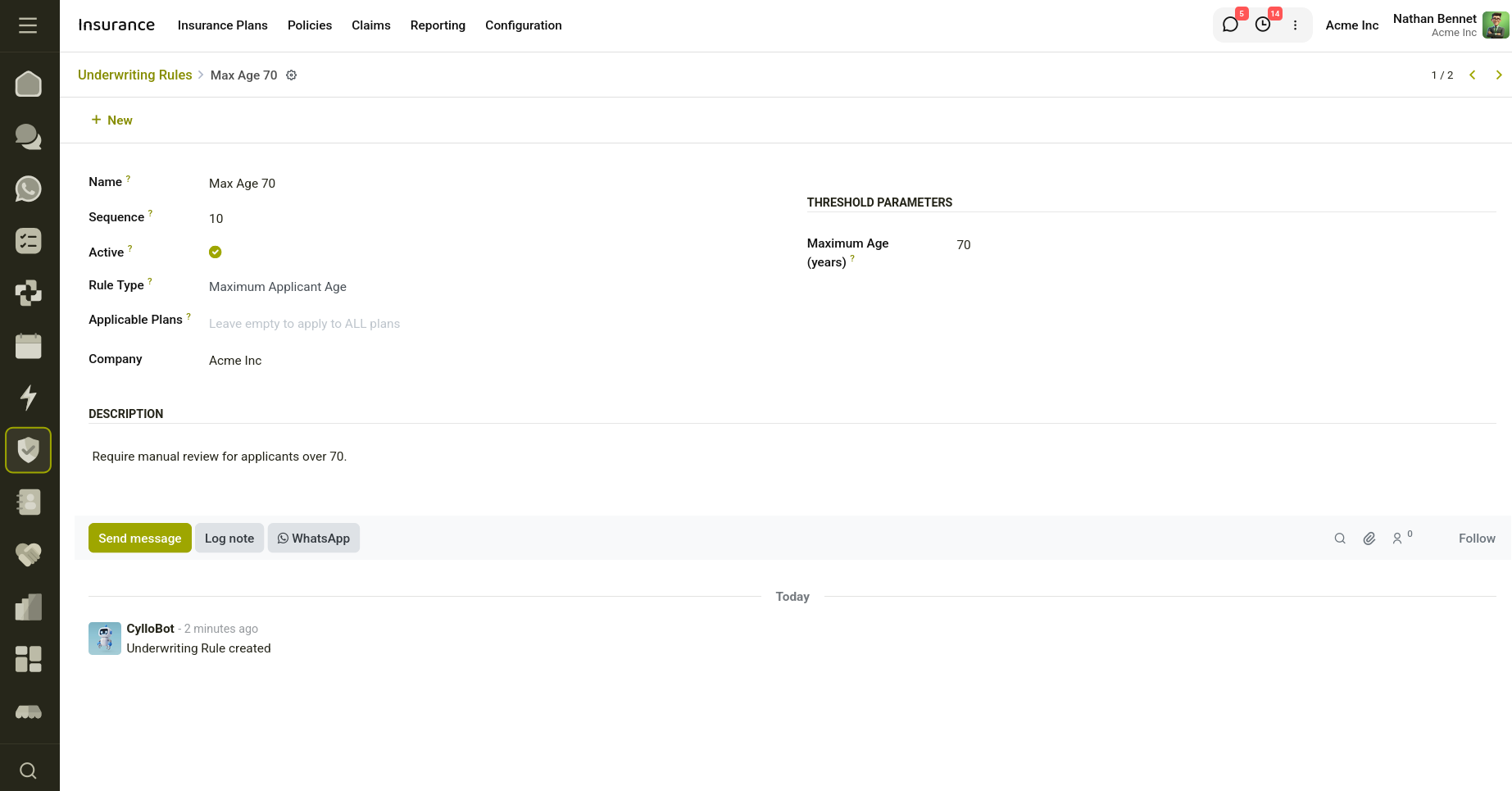
Fig 2.1 — Underwriting rule with Maximum Applicant Age.
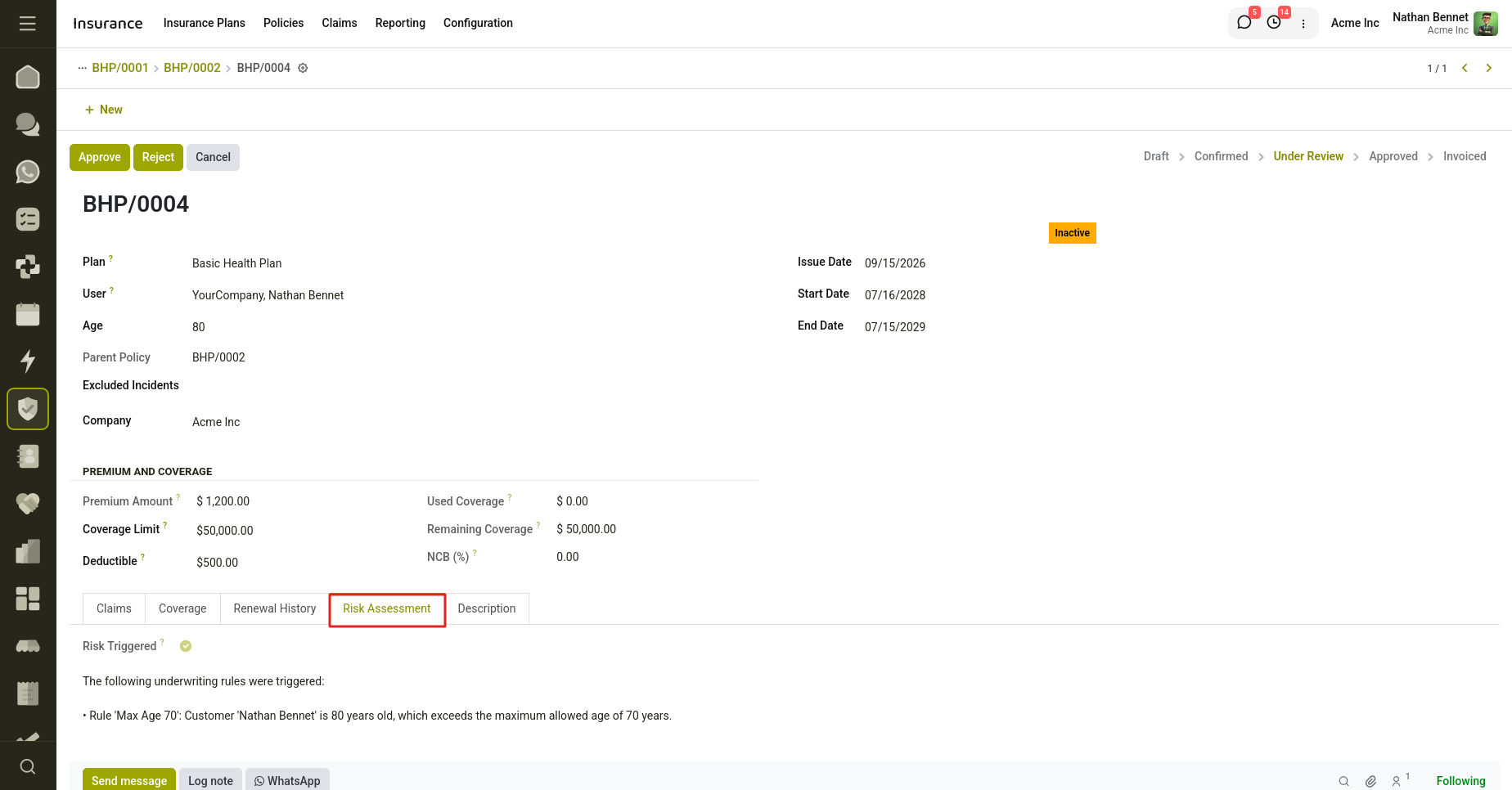
Fig 2.2 — Triggering the Underwriting rule in Insurance policy risk assessment.
Rule Type Working
- Maximum Applicant Age: This rule evaluates the customer's age against the configured maximum age value. If the customer's age exceeds the defined age limit, the rule is triggered and the policy is moved to Under Review for manual assessment. This helps prevent issuing policies to applicants whose age falls outside the acceptable risk criteria.
- Maximum Coverage Limit: This rule checks whether the requested policy coverage amount exceeds the configured maximum coverage threshold. If the coverage limit requested by the customer is greater than the allowed amount, the system triggers the rule and sends the policy for additional review.
- Minimum Premium Amount: This rule validates the calculated policy premium against the configured minimum premium value. If the premium amount is lower than the specified threshold, the system considers it a potential risk condition and routes the policy for manual verification.
- Severe Accident / Claim History: This rule analyzes the customer's previous approved and paid claims across all policies. If the total number of historical claims exceeds the configured limit, the system identifies the customer as having a severe claim history and triggers manual review.
- High Claim Frequency: This rule evaluates the number of claims submitted by a customer within a configured lookback period. If the customer has submitted claims exceeding the defined threshold during the specified time period, the policy is considered high risk and moved to Under Review.
- High-Risk Incident Type: This rule checks whether the customer has any previous approved or paid claims involving predefined high-risk incident types. If such incidents are found in the customer's claim history, the system triggers the rule and routes the policy for additional risk evaluation.
2.2 Policy Types
The Insurance Policy Type is used to categorize and organize different types of insurance policies within the system. It serves as a classification mechanism that helps group insurance plans based on their purpose and coverage category, such as health insurance, vehicle insurance, life insurance, travel insurance, or property insurance.
Policy types simplify insurance management by allowing users to structure plans under specific categories, making policy creation and organization easier. This helps maintain consistency across insurance operations and improves policy management and reporting.
How to Create an Insurance Policy Type
To create a new insurance policy type:
- Navigate to Insurance → Configuration → Policy Types
- Click New
- Enter the required information:
- Policy Type Name
- Policy Code
- Description
- Save the record
The created policy type can then be selected while creating insurance plans.
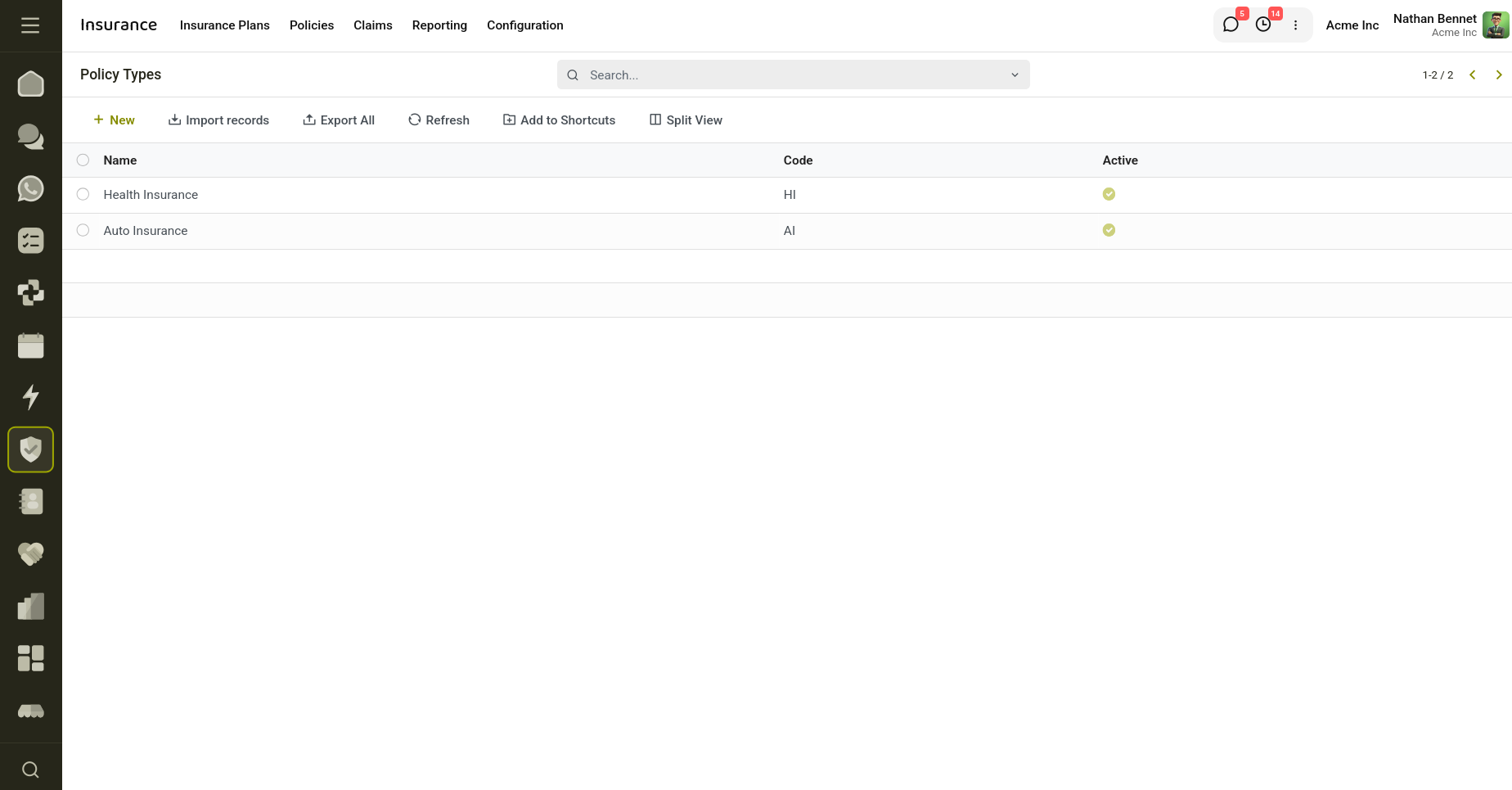
Fig 2.3 — Policy Types.
Key Fields
- Name: Defines the name of the policy type.
- Code: Specifies a unique short code for identifying the policy type.
- Description: Additional information regarding the policy type.
- Company: Company associated with the policy type.
2.3 Coverages
The Insurance Coverage is used to define and manage different coverage components provided under insurance plans and policies. Coverage represents the protection or benefits offered by an insurance provider for specific risks, incidents, or services.
Coverage records help organize and standardize benefits that can later be linked to insurance plans. By creating predefined coverage options, users can reduce repetitive configuration and ensure consistency across different insurance products.
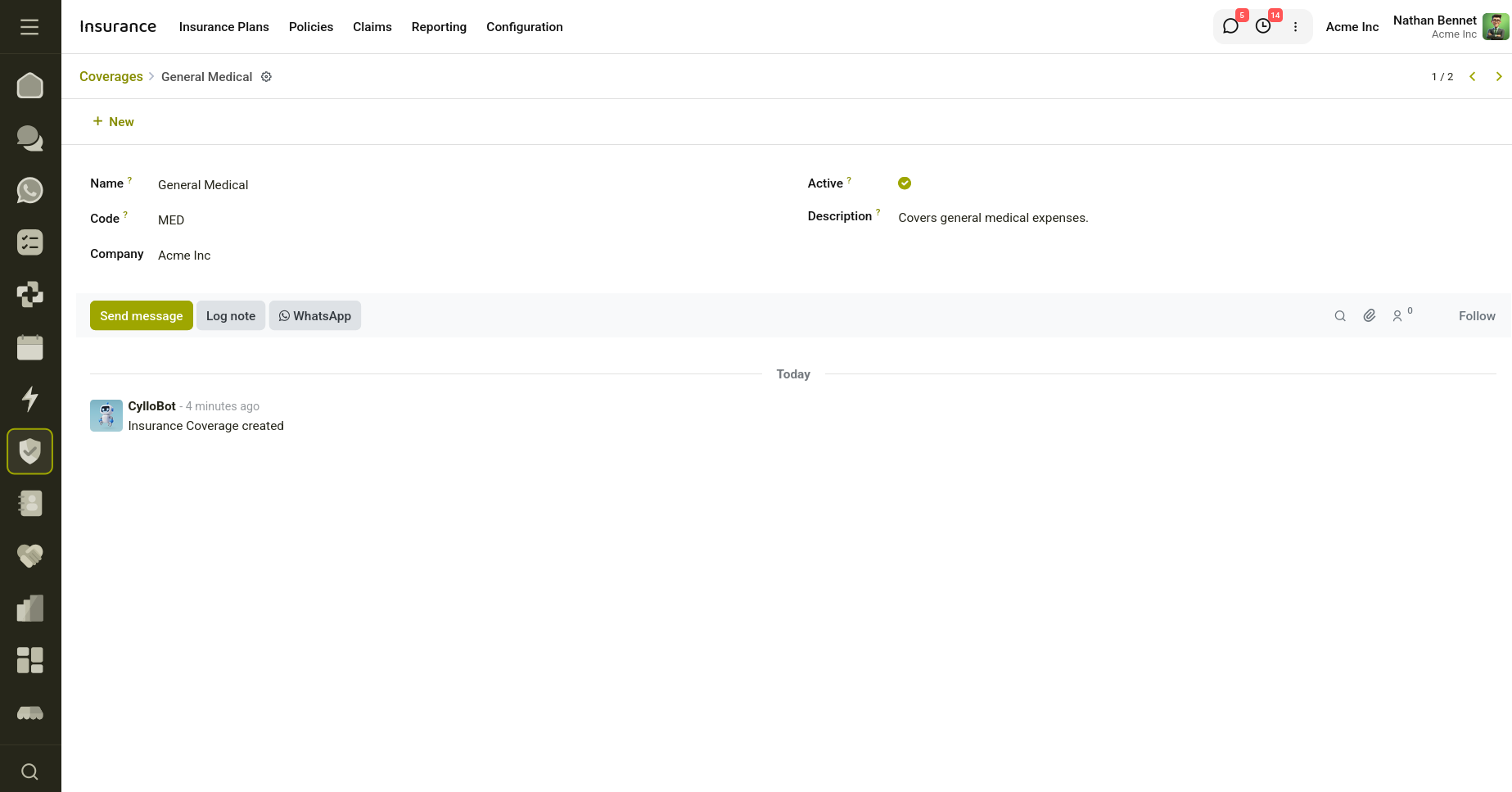
Fig 2.4 — Policy Coverage.
How to Create Insurance Coverage
To create a new insurance coverage:
- Navigate to Insurance → Configuration → Coverages
- Click New
- Enter the required information:
- Coverage Name
- Coverage Code
- Description
- Save the record
The created coverage can later be associated with insurance plans and policy configurations.
Key Fields
- Name: Defines the name of the insurance coverage.
- Code: Specifies a short code used for identifying the coverage.
- Description: Provides additional information regarding the coverage and the benefits included.
- Company: Company associated with the coverage.
2.4 Incident Type
The Insurance Incident Type is used to define and manage different types of incidents that can occur under insurance policies and claims. Incident types help categorize claim events such as accidents, fire damage, theft, medical emergencies, natural disasters, or other insured events.
By creating predefined incident types, users can standardize claim processing and simplify incident classification throughout the insurance workflow. Incident types can also be used in underwriting rules to identify high-risk incidents and improve risk assessment processes.
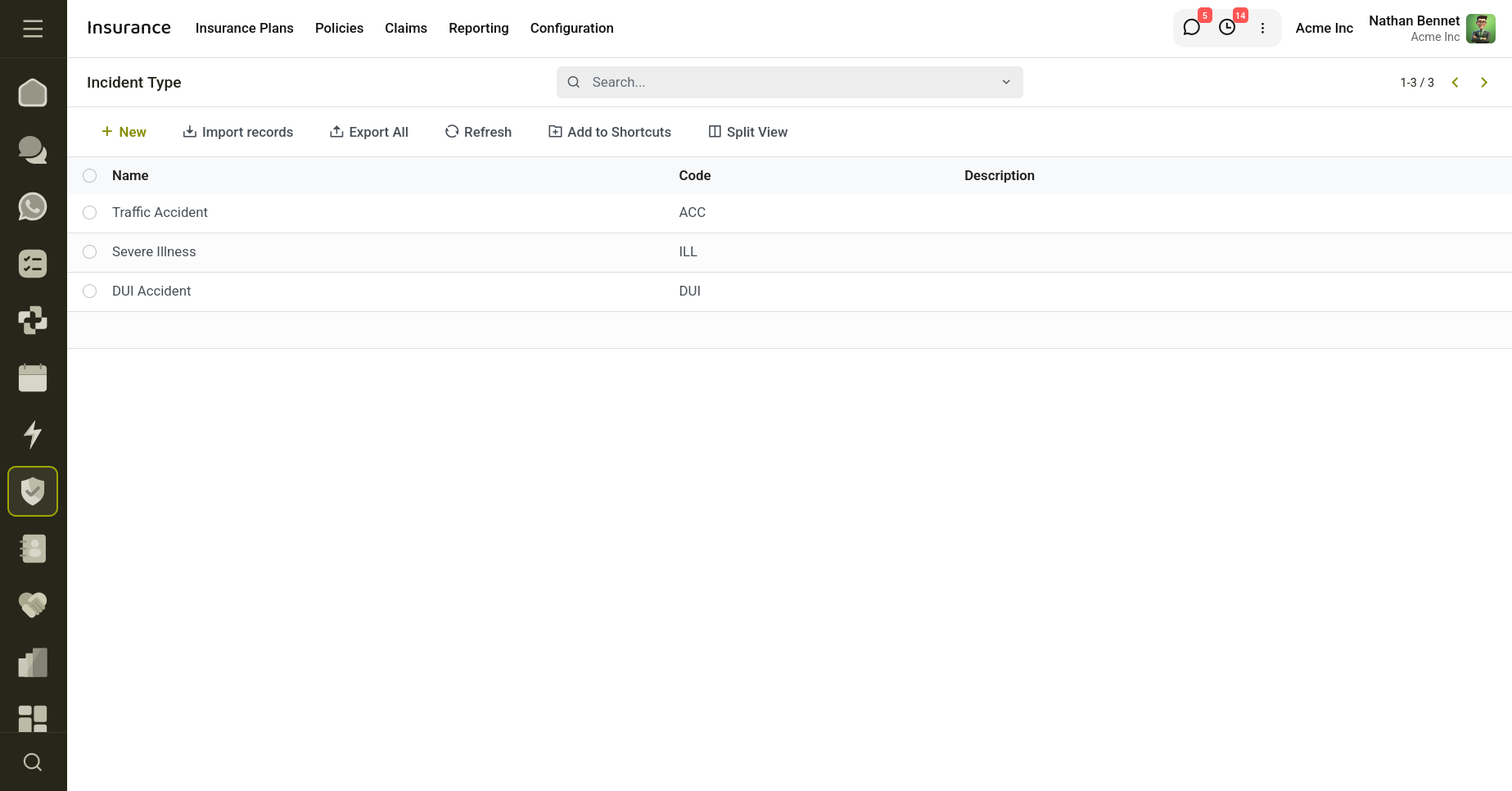
Fig 2.5 — Incident Types.
How to Create an Insurance Incident Type
- Navigate to Insurance → Configuration → Incident Type
- Click New
- Enter the required information:
- Incident Name
- Incident Code
- Description
- Save the record
The created incident type can later be selected while creating claims or configuring underwriting rules.
Key Fields
- Name: Defines the name of the incident type.
- Code: Specifies a short code used for identifying the incident type.
- Description: Provides additional information regarding the incident type and its purpose.
- Company: Company associated with the incident type.
3. Reporting
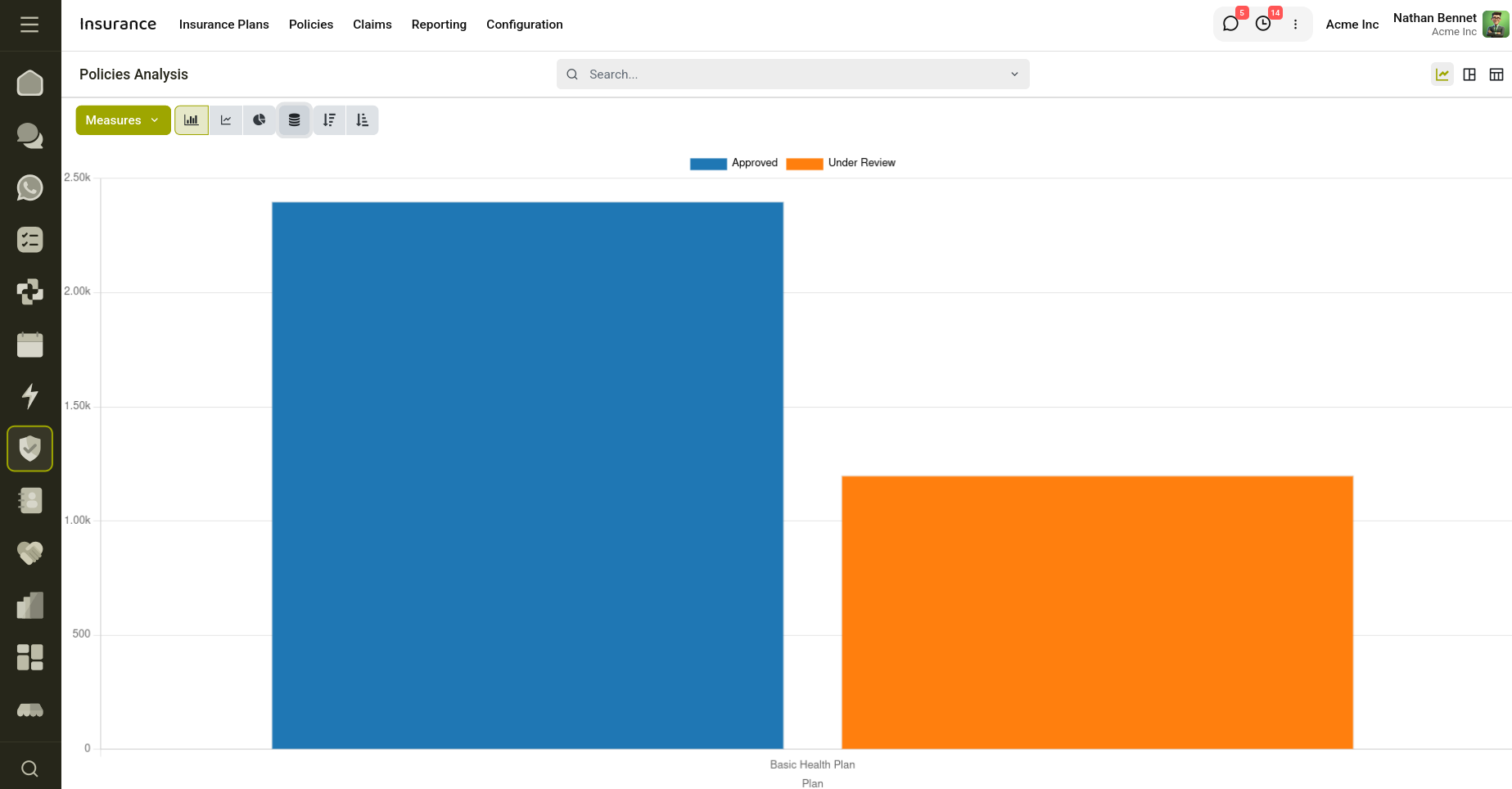
Fig 3.1 — Insurance Policy Analysis Report.
The Reporting section provides analytical insights into insurance operations through visual reports and data analysis tools. It enables users to monitor policies, claims, renewals, and overall insurance activities using charts, filters, and grouping options.
The reporting system helps organizations track performance, identify trends, and gain meaningful business insights for better decision-making.
To access the reporting section, navigate to Insurance → Reporting → Policies Analysis. Users can select the preferred report view and use available options such as filters, grouping methods, and measures to customize the displayed information according to business requirements.